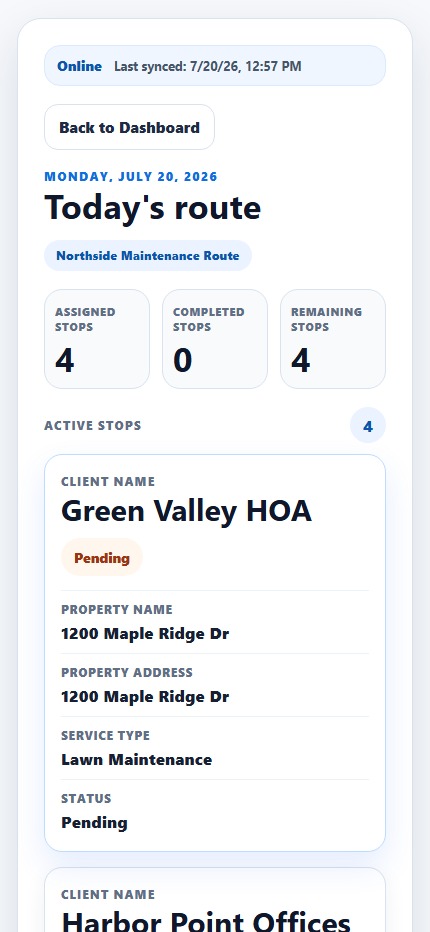
The plan should travel with the people doing the work. The Techunly Crew App gives field teams a mobile workspace for their route, assigned jobs and updates.
Product screenshots shown in English. Select the image to enlarge it.
01
Start with the assigned work
Before heading to a property, the crew needs to know where it is going and which jobs are assigned. The Crew App puts route details and assigned work into a focused mobile view. Scheduling and dispatch remain connected to the decisions made in the office.
02
Record the workday as it happens
Field crews can clock in, complete jobs and communicate updates. These are different moments in the day: starting work, finishing an assignment and reporting what the office needs to know. Explore each step during the trial to see how it fits your team’s routine.
03
Work across English and Spanish
Techunly supports English and Spanish for the people running the business and doing the work. When evaluating the platform, involve a crew member as well as someone from the office. Check that both can follow the workflow they will actually use.
Field crews
Before you get started.
What can field crews do in the Crew App?+
Crews can consult route details and assigned jobs, clock in, complete jobs and communicate updates from the field.
Does Techunly support Spanish-speaking crews?+
Techunly supports English and Spanish. Try the relevant workflows in your team’s preferred language during the trial.
Can I see the mobile interface before starting?+
Yes. The screenshot on this page shows the Crew App. Select it to open the full image; product screenshots are shown in English.
Billing details are collected through Stripe. Your subscription begins automatically after the trial unless you cancel. Billed monthly; cancel anytime.